
What Is Headless Software? Definition, Examples, and Why It Suddenly Matters
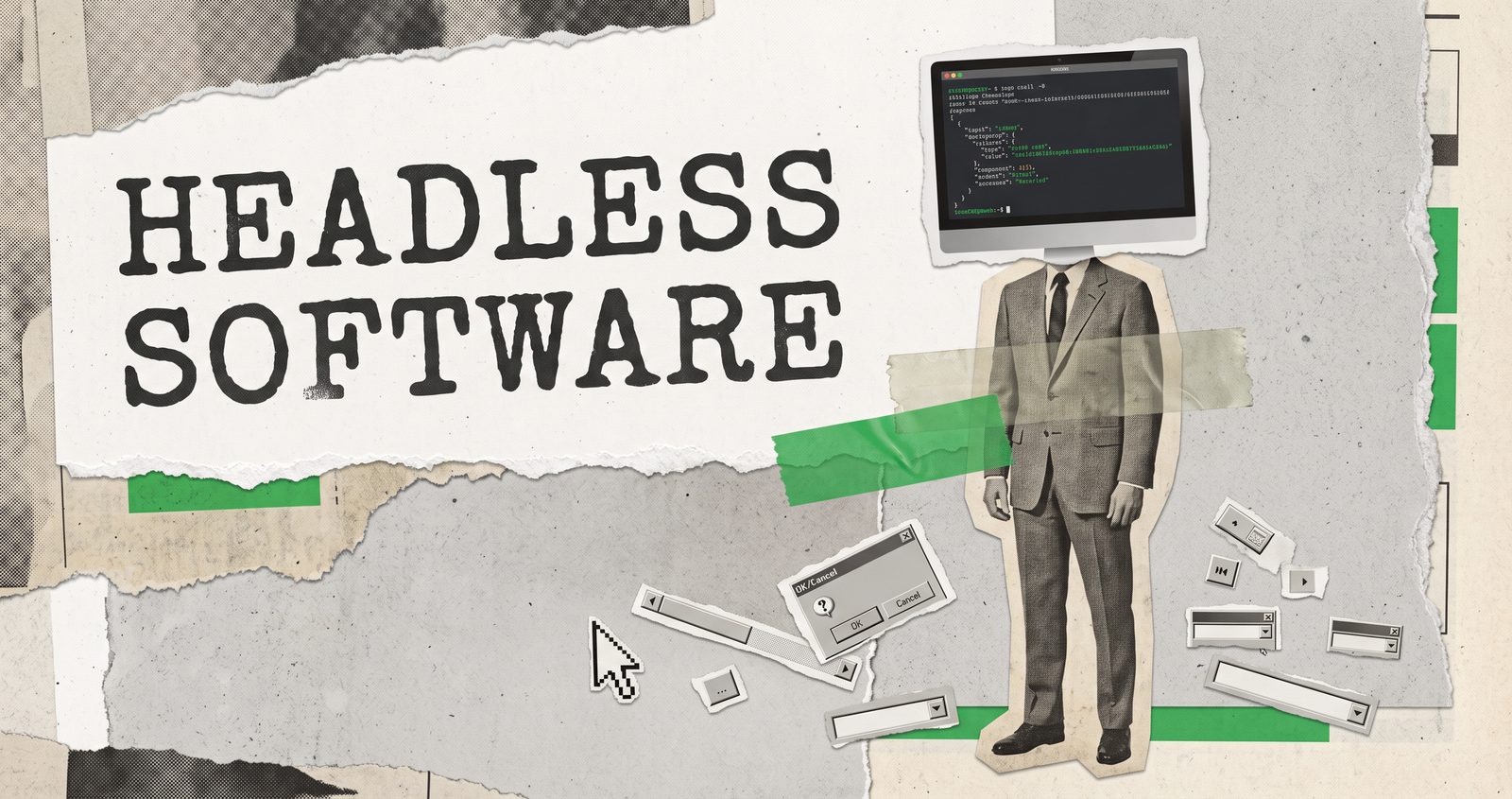
“Headless” is an unfortunate name for something quite useful.
It sounds like a horror film, or a server that has caught fire. What it actually describes is one of the larger shifts happening in software right now, and this year it stopped being a developer curiosity and turned into a strategy.
A quick sense of the momentum. In April, Salesforce announced that using its platform in a browser was now optional. In October, Chamath Palihapitiya went on All-In and argued the same shift has rendered software IP worthless. Somewhere in between, one engineer rebuilt open-source versions of seven Adobe applications without ever seeing Adobe’s source code.
There is something funny buried in this. The industry spent two decades making interfaces beautiful. It hired designers, built design systems, and held entire conferences about the correct corner radius of a button. The new pitch is that you will not have to look at any of it.
So it is worth knowing what the word means.
Headless software is software with the user interface removed. The “head” is the UI: the screens, the buttons, the thing a person looks at. A headless system still does everything it did before, but you reach those capabilities through an API, a command line, or an MCP server rather than by sitting in front of it and clicking.
That is the whole definition. The reason it is suddenly everywhere is that the thing on the other end changed.
The quick version:
- The term is older than the web and comes from hardware, not software
- You have already used headless software, probably without calling it that
- What changed in 2026 is the consumer: AI agents, not developers
- Salesforce has committed its entire platform to this
- Chamath Palihapitiya argues it makes software IP worthless, and he is half right
- If your only moat was the interface, this is the part where you find out
On this page
- Where the term comes from
- Headless software examples
- Headless vs traditional software
- Headless, API-first, decoupled, composable
- What changed in 2026
- What Salesforce did
- Why Chamath says software IP is worthless
- How to tell if software is actually headless
- How we made the ToolSuite headless
- What this means if you are building software
Where the term comes from
It started with hardware.
A headless computer is a machine running with no monitor, keyboard, or mouse attached. The “head” is the display and the input gear. You administer it over the network instead, which is how servers in a rack and embedded devices in a factory have worked for decades. Nobody thought this was a trend. It was just how machines that nobody needed to look at were run.
The word carried over to software that could run the same way: no graphical interface present, inputs and outputs arriving over a network connection or a serial port. The usual signal was practical rather than philosophical. Ordinary software would try to initialise a graphics device, fail to find one, and crash. Headless builds simply did not ask.
So for most of its life “headless” described infrastructure, and it described an absence. It is only recently that removing the interface became a strategy rather than a constraint.
Headless software examples
You have almost certainly used several of these.
- Headless browsers. Chrome with no window drawn. It loads pages, runs JavaScript, fills forms, and takes screenshots, driven by code. This powers most automated website testing, and it is how a lot of the web gets measured.
- Headless CMS. Contentful, Strapi, Sanity. They store, version, and serve your content and render none of it. The front end is yours to build, and the same content can feed a website, an app, and a kiosk.
- Headless commerce. The cart, catalogue, and checkout logic served over an API, with the storefront built separately on top.
- Headless rendering. Blender can render images and animations from the command line with nothing open on screen, which is how render farms work.
- Game servers. A multiplayer server runs the physics, rules, and state for everyone playing, and draws nothing at all. The graphics live on your machine, not on it.
- Media tools. VLC has a headless mode for transcoding and streaming without an interface.
- Essentially all server software. Databases, web servers, message queues. None of them have ever had a UI in the path.
The pattern across all of these: the capability is valuable, and the interface was never the valuable part.
Headless vs traditional software
| Traditional | Headless | |
|---|---|---|
| Primary way in | The interface | API, CLI, or MCP server |
| Who operates it | A person, in a browser or app | Another program, or a person through one |
| Where the UI lives | Inside the product | Built separately, or not at all |
| Who it is designed for | End users | Developers, and now agents |
| Typical pricing | Per seat | Per usage or consumption |
| What the vendor controls | The whole experience | The capability, not the experience |
The last row is the one that matters most, and it is the reason this stopped being a purely technical decision.
Headless, API-first, decoupled, composable
These four get used interchangeably and they are not the same thing. Here is the short version:
- Headless describes what is missing: the interface.
- API-first describes the build order: the API is designed before any UI, so it is complete rather than retrofitted.
- Decoupled describes the separation: front end and back end can change independently.
- Composable describes the assembly: a system built from independent, swappable services.
You can be headless without being composable. You can be composable and still have an API that covers a fraction of what your product does. And you can be all four and still be useless to an AI agent, because none of them require you to describe your capabilities in a way a model can discover.
The question that cuts through all of it is much simpler, and it is in the practical test further down.
What changed in 2026
For most of its history, the consumer of a headless system was a developer.
That is a high-effort, low-frequency relationship. Someone reads your documentation, writes an integration, tests it, ships it, and maintains it. You could get away with an API covering a fraction of what your UI could do, because a motivated human would work around the gaps, file a ticket, or write a scraper.
An AI assistant is a different kind of consumer. It arrives with no integration written. It reads what your system says it can do and tries to do it. It does not email support when something is missing. It fails, or worse, does something approximately right.
That raises the bar in a specific way: the gap between what you can do by clicking and what you can do programmatically stops being an inconvenience and becomes the entire product experience.
This is the problem Model Context Protocol addresses. MCP is a standard way for software to describe its own capabilities to an AI assistant, so the assistant can discover what exists and call it correctly without anyone writing a custom integration first. It is the difference between having an API and being legible to an agent.
What Salesforce did
If you want evidence this is a real shift rather than a vendor talking point, the clearest one arrived on April 16, 2026, when Salesforce announced Headless 360 at its TDX developer conference in San Francisco.
The commitment is blunt: expose every platform capability as an API, an MCP tool, or a CLI command, so the browser becomes optional. It shipped with more than 100 new tools, including over 60 MCP tools and more than 30 preconfigured coding skills, alongside a partner marketplace carrying thousands of agents and MCP servers.
Two details are worth more than the headline numbers.
Why they say they did it. Salesforce EVP Jayesh Govindarjan described early agent deployments turning brittle: customers would change one thing and have to retest everything, because nothing in the system was stable enough to reason about. Giving agents a well-described surface to call, instead of letting them improvise against screens, was partly a reliability decision rather than purely an access one.
The pricing consequence. Salesforce is moving toward consumption-based pricing alongside this, which is a quiet admission that per-seat licensing assumes a human occupies the seat. When an agent does the work, seats stop describing usage. One of their customers, the B2B travel company Engine, built a customer service agent in twelve days that now handles half its cases autonomously. Count the seats on that and the number tells you nothing useful.
Why Chamath says software IP is worthless
Salesforce going headless is an architecture story. In October it got turned into a much bigger one.
On the All-In podcast on October 9, 2026, Chamath Palihapitiya argued that AI has rendered software intellectual property effectively worthless. The chain of reasoning is short:
- Services are going headless. He pointed at Benioff’s Salesforce and at Musk doing the same across his products.
- Agents can wrap a headless service and connect it to any experience.
- If the interface is no longer how the product gets reached, and the interface was the moat, the moat is gone.
- So arguments about who owns the software IP in a commercial negotiation stop mattering. His version: who cares, solve the problem.
The evidence he reached for was the Adobe clones. In early October 2026, Brandon Thomas, an engineer with fifteen years in the industry, used Claude Opus 5.5 and Rust to build open-source replacements for seven Adobe flagships: PhotoCraft for Photoshop, VectorCraft for Illustrator, FilmCraft for Premiere, LightCraft for Lightroom, PrintCraft for Acrobat Pro, EffectCraft for After Effects, and DesignCraft for InDesign. The whole suite, published under open licences, built by one person.
One correction, and it cuts the other way
This is widely being described as Adobe’s products getting decompiled. That is not what happened, and the truth is more unsettling.
ArtCraft is a clean-room reimplementation. Nobody read Adobe’s source code. The method was to observe the software from the outside, watch what each tool and panel actually did, and rebuild that behaviour from scratch. Which means the usual legal protection does not apply, because there is nothing to infringe. You cannot copyright what your software visibly does.
If your product’s defensibility rests on behaviour a competitor can watch, that defensibility is now a weekend project for someone with a good model.
Where the argument holds, and where it overreaches
He is right about the direction. Interface lock-in, proprietary workflows, and brand inertia are all weaker than they were twelve months ago, and anyone whose plan was “customers will not want to rebuild this” should be nervous.
But “worthless” is doing a lot of work, and two things get skipped.
The evidence is thinner than the headline. ArtCraft is alpha. Its own author calls it far from production-ready, is paying bug bounties, and is asking for contributors to stabilise it. Early users report glitches and unpredictable tools. Cloning what software does in a demo is a different achievement from running it for millions of people who will not tolerate losing a file.
The agent could watch Photoshop’s buttons. It could not watch Adobe’s customer list. Or its pipeline, its training data, its distribution into every design school, or its enterprise contracts. What survives is precisely the part that cannot be observed from the outside: proprietary data, network effects, distribution, regulatory position, and the customer relationship.
So the honest version is narrower than “software IP is worthless,” and more useful:
The interface has stopped being a moat. If it was your only one, you did not have one.
How to tell if software is actually headless
Most vendors will tell you they have an API. That is not the same claim. Four questions sort it out:
- Can you do everything through the API that you can do in the UI? If the answer involves a list of exceptions, it is API-enabled, not headless.
- Was the API built first, or added afterwards? Retrofitted APIs tend to mirror the database rather than the workflow, which makes them awkward for anything real.
- Can an agent discover what it can do without a human reading docs? This is what an MCP server provides, and it is the line between developer-accessible and agent-accessible.
- Can you set permissions and limits outside the interface? If authorization only exists as checkboxes in an admin screen, nothing can safely operate the system on your behalf.
How we made the ToolSuite headless
We made the Startup Ignition ToolSuite headless, on the same bet, at a very different scale.
Deciding to do it was easier than it might sound, for a reason that connects directly to the argument above: our moat was never the interface. It is the methodology and the evidence from a thousand-plus ventures that have run through it. Nothing about exposing the tools to an agent gives that away. If removing your UI feels like giving away the business, that is worth sitting with, because it may be telling you something about the business rather than about headless.
The practical reason was simpler. Founders were already working inside Claude, ChatGPT, Cursor, and Codex. Asking them to leave that, open a tab, and re-explain their startup to a different system was friction we were imposing for no reason. The validation work does not care which window it happens in.
So the ToolSuite runs an MCP server at https://mcp.startupignition.com/mcp. Connected to an assistant, it can:
- Read your idea analyses, business model canvases, personas, assumptions, interview scripts, and mentor conversations
- Run the actual tools: Idea Analysis, Business Model Canvas, Assumption Identification, Market Research
- Create and edit new ideas, canvas answers, items, and assumptions, with full history
- Export PDFs and page screenshots
Claude, ChatGPT, Claude Code, Cursor, VS Code with Copilot, Codex, Gemini CLI, and Grok each have a setup path on the connector page. You authorize through a browser sign-in and pick the scope: which workspaces the assistant can reach, whether it can read, run tools, or edit, and a daily credit limit.
The more interesting half: what it refuses to do
Building the connector was mostly a question of what not to expose, and this is the part of headless design that gets least attention and causes the most damage when skipped.
A browser session has a person in it. People make judgement calls, notice when something looks wrong, and stop. An agent has none of that. So a headless system has to encode its refusals in advance.
Ours never exposes participant identities or interview contact information. Customer discovery depends on people answering honestly, and that depends on their details not leaking into an assistant’s context window. It never exceeds the daily credit limit you set. It never touches billing. It never shows the assistant pricing information, so there is nothing to reason about and no way to talk itself into a purchase. If an organization disables connections, it stops working entirely.
Requests that cross a line do not get negotiated down to something smaller. They fail.
If you are evaluating anyone’s connector, that is the question I would lead with: not what it can do, but what it refuses to do. A vendor who cannot answer that has not finished thinking about it.
Connect the ToolSuite to your assistant The MCP server described above, running live. Claude, ChatGPT, Cursor and the rest each have a setup path. About two minutes. Set up the connector →What this means if you are building software
Three things worth sitting with, whatever stage you are at.
Your UI is becoming one client, not the product. If the only complete path into your system is your interface, you are betting customers will keep coming to you. Increasingly they would rather their assistant came to you on their behalf. That is an architecture decision, and it gets expensive to reverse once customers depend on the shape you chose.
Per-seat pricing has an expiry date in agent-heavy categories. Not everywhere, and not tomorrow. But if an agent does in minutes what used to occupy a person for a day, the seat has stopped measuring anything.
The authorization layer is now a product surface. Scopes, spending limits, and refusals used to be back-office concerns nobody read. In a headless world they are the first thing a careful buyer evaluates, because they are the only thing standing between an agent and a mistake made at machine speed.
None of this means you should go headless this quarter. Most early products should not: you have more urgent problems, and shipping an MCP server for a product nobody has validated is the most sophisticated way yet invented to avoid talking to customers. Validate the thing first. We would say that regardless of what we sell, and we built a suite of tools for exactly that.
But when you design the system, assume something other than a browser will eventually want in. That assumption is nearly free to hold early and genuinely expensive to retrofit later.
If you want to see it working, the connector setup is here, and it takes about two minutes.
 Startup Ignition Ventures
$20M pre-seed fund. First checks $100K to $1M. Real feedback in hours.
Pitch SIV →
Frequently Asked Questions
What is headless software?
Headless software is software with its user interface removed. The ‘head’ is the UI, the screens and buttons a person clicks. A headless system exposes the same capabilities through APIs, command-line tools, or an MCP server instead, so another program can do the work directly. The software still does everything it did before. There is just no requirement that a human sit in front of it.
Does headless mean no GUI?
Yes, that is the literal meaning. A headless program has no graphical user interface drawn at all. It still runs, still does its work, and still produces output, but it receives instructions through an API, a command line, a configuration file, or an MCP server rather than through screens a person clicks. Nothing about the underlying capability changes. What disappears is the requirement that a human sit in front of it.
What is headless architecture?
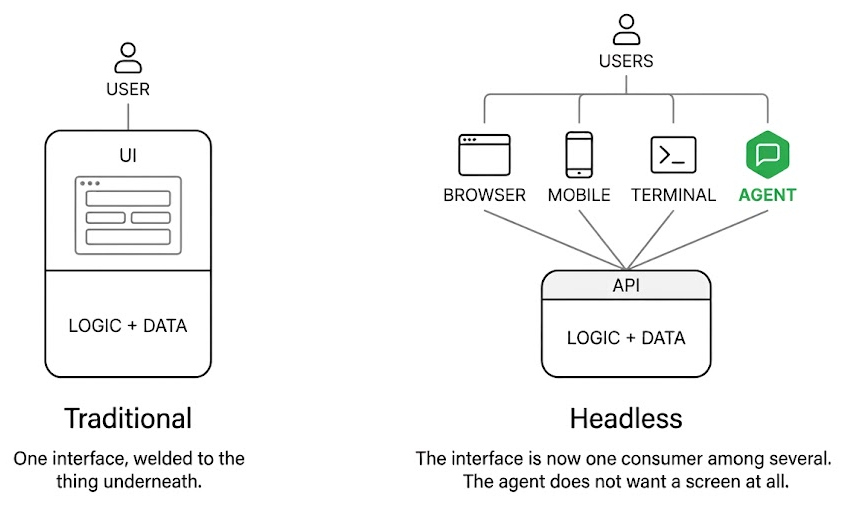
Headless architecture is a system design in which the logic and data live behind an API, and the user interface is treated as one client of that API rather than part of the system itself. A browser, a mobile app, a command line, and an AI agent can all consume the same backend. The practical test is whether the interface is the only complete path in. If it is, the system is not really headless, whatever its architecture diagram says.
What is a headless application?
A headless application is an application that runs without its own graphical interface, exposing its functionality through an API or command line instead. The term applies to anything from a browser running with no window drawn, to a content system that stores content but renders none of it, to a commerce platform that handles carts and checkout while the storefront is built separately on top.
Where does the term headless come from?
It comes from hardware, not software. A headless computer is a machine running with no monitor, keyboard, or mouse attached, administered over the network instead. The ‘head’ is the display and input gear. Servers and embedded devices have run this way since long before the web, and the word carried over to software that can run the same way: no graphical interface present, inputs and outputs arriving over a network connection or a serial port instead.
What are examples of headless software?
A headless browser is Chrome running with no window drawn, used for automated testing and screenshots. A headless CMS such as Contentful or Strapi stores and serves content but renders none of it. Headless commerce does the same for carts and inventory. Blender can render images from the command line with no interface open. Multiplayer game servers run game logic with nothing on screen. VLC has a headless mode. Most server software has always been headless, which is why the term felt unremarkable until recently.
What is a headless browser?
A headless browser is a real browser running with no window drawn on screen. Chrome and Firefox both support this. It loads pages, runs JavaScript, fills in forms, and takes screenshots exactly as a normal browser would, but it is driven by code rather than by a person. It is the oldest widely used example of headless software, long predating headless CMS or headless commerce, and it is used for automated testing, scraping, and rendering.
Is a headless CMS the same as headless software?
A headless CMS is one example of headless software, not a synonym for it. The confusion is common because content management is where most people first met the term. A headless CMS such as Contentful or Strapi stores, versions, and serves content through an API and renders none of it. Headless software is the broader category: any software whose capabilities are reachable without its interface, which includes browsers, commerce platforms, media players, build tools, and increasingly entire enterprise platforms.
What is the difference between headless software and an API?
An API is one way to make software headless, but headless is the broader architectural choice. A product can have an API bolted onto the side that covers ten percent of what the UI can do, and that product is not really headless. Headless means the interface is not the only complete path into the system, so anything you can do by clicking you can also do programmatically. The 2026 version usually adds an MCP server on top, which is what makes the capabilities legible to an AI assistant rather than just to a developer.
What is the difference between headless and API-first, decoupled, or composable?
They overlap and are often used loosely. Headless describes what is missing: the interface. API-first describes the build order, designing the API before any UI. Decoupled describes the separation between front end and back end. Composable describes assembling a system from independent swappable services. A product can be headless without being composable, and composable without being agent-ready. The practical question that cuts through all four is simpler: can you do everything through the API that you can do by clicking?
What is the difference between headless and traditional architecture?
In traditional architecture the interface is fused to the logic and data beneath it, so the only complete way into the system is through the screens that shipped with it. In headless architecture the logic and data sit behind an API, and the interface becomes one consumer among several. The difference shows up the moment something other than a browser wants in. Traditional systems require you to automate the interface. Headless systems let you skip it.
What does headless mean in AI?
In an AI context, headless describes software an agent can operate directly, without pretending to be a person clicking a screen. Before this, automating a system meant driving its interface: scripting clicks, parsing the page, breaking whenever a button moved. A headless system exposes its capabilities as tools an agent can call, usually through an API or an MCP server. This is what changed in 2026. The architecture is decades old. The consumer is new.
What is Salesforce Headless 360?
Headless 360 is Salesforce’s initiative, announced on April 16, 2026 at its TDX developer conference in San Francisco, to expose every platform capability as an API, an MCP tool, or a CLI command so that AI agents can operate the platform without a browser. It shipped with more than 100 new tools, including 60+ MCP tools and 30+ preconfigured coding skills. It is the clearest signal so far that headless is becoming a default expectation for business software rather than a niche architecture.
Is headless software less secure?
It is not inherently less secure, but it moves the security question from the UI to the authorization layer, and that is a real shift. A browser session has a person in it making judgement calls. An agent does not. So a headless system has to decide in advance what it will never do regardless of what it is asked: which data is off limits, what spending ceiling applies, and who can revoke access. If a vendor cannot tell you what their connector refuses to do, that is the thing to ask about.
 Back to All News